
How to showcase multiple builds for your guild
Your guild rebuilt? Changed hands? Start fresh without losing your history. Each build gets its own post, votes, and page.
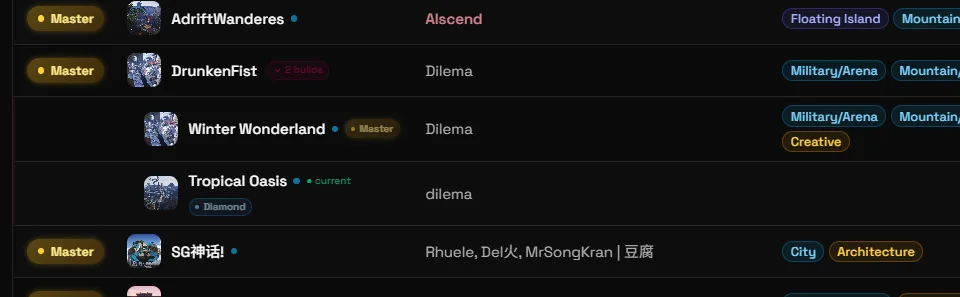
Your guild can have multiple builds on the leaderboard. Each build has its own post with its own score, screenshots, and page. They appear grouped under your guild name.
How to add a build
Create a new post in #guild-base-showcase named:
GuildName: Build TitleExamples: DrunkenFist: Winter Wonderland, DrunkenFist: Tropical Oasis
You have to use the same guild name! The site picks up the grouping automatically.
The older GuildName - Build Title format (with a dash) also works but beware of the space before and after -.
Optional fields in your first post
You can add any of these lines anywhere in your first post:
Current: yes
Hosted at: LittleFury [12345678]| Field | What it does |
|---|---|
Current: yes | Marks this as the guild’s active build (green tag and dot on the site) |
Hosted at: GuildName [ID] | Links to the guild currently hosting this build (ID is optional) |
Voting and scores
Each build has its own independent score and leaderboard rank. The grouped entry shows the best rank across all your builds. Clicking it expands to show each build individually.
Tips
- Don’t delete old posts. Old builds keep their votes and their page stays up.
Any questions? Ask in Discord.